Promotions in Agentforce Revenue Management: Setup, Examples, and Common Mistakes
A practical walkthrough of Promotions in Revenue Cloud (Spring '26): how to configure them step by step, two worked examples, and the setup mistakes that stop discounts from reaching the quote.
Elena Savenko
Salesforce Developer
7 min read
·
August 8, 2026
Ask three people why a customer got 15% off and you may get three answers. The discount came from a price rule, an Apex class, or a manual override, and the reasoning behind it is rarely recorded anywhere.
Salesforce Spring '26 release changes that. Promotions turn a discount into a record with dates, eligibility, priority, and a visible effect on price – one object anyone can point at.
This article covers how to set them up step by step, two worked examples, and the mistakes that stop a promotion from reaching the quote.
Summary
Promotions arrived in Spring '26, replacing the manual-discount, CPQ price-rule, and custom-Apex patterns teams stitched together before.
Setup is a chain, not a checkbox: Context Service, Global Promotions Management, a rule library, a pricing-procedure edit, configurator flows, and record access all have to line up before a single discount fires.
Two things bite most teams: promotions and derived pricing cannot share a pricing procedure, and the evaluation method you pick (Stacked, First Eligible, Highest Discount) silently decides how discounts combine.
Promotions are not a marketing switch. They only affect pricing if they execute inside the pricing procedure – which is why most failures show up as a discount that never applies.
What Promotions replace
Before, promotional pricing in Revenue Cloud was an assembly job. Teams reached for manual discounts, Salesforce CPQ price rules, discount schedules, decision tables, or an external pricing engine – often several at once. Each worked in isolation. Together they made a promotion hard to govern:
⮕ a rep couldn't always say why a discount had landed
⮕ an admin maintained the logic in three places
⮕ and marketing had no single view of what was live, when, and for whom.
The native Global Promotions Management engine collapses that into one workspace. Pricing and marketing teams define a promotion, set its eligibility and dates, and watch its effect land as a discrete line in the price waterfall. The benefit is now a record, not a typed-in number – which is exactly what auditing has always needed.
How to set up Promotions in Agentforce Revenue Management
The order below matters. Skip a layer and the promotion may exist as a record yet never evaluate, or evaluate and never show.
1. Enable the platform features
Available in: Enterprise, Unlimited, and Developer Editions of Revenue Management with the Revenue Cloud Advanced license, and the Global Promotions Management Basic Add-On license or Loyalty Management – Growth or Advanced license.
Promotions depend on Context Service to feed transaction, customer, product, and line-item data into evaluation. Most ARM orgs already have it on – confirm your extended Sales Transaction context definition is active and mapped.
Then, in Setup → Global Promotions Management Settings, turn on Global Promotions Management, Product Catalog Management (if promotions will touch bundles), and Promotion Evaluation and Execution.
If users need to see promotion details in the transaction UI, also enable Price Waterfall and Price Waterfall Persistence. The waterfall is what turns the promotion from a hidden adjustment into a pricing step anyone can audit.
Note! Global Promotions Management cannot be switched off once enabled – the same rule that governs the irreversible ARM settings applies here. Sandbox it first.
Why it matters: Promotions run on the Revenue Cloud pricing and context framework. Without this groundwork the promotion can exist as a record and still fail – either it never evaluates, or it evaluates and never surfaces in the transaction experience.
2. Create a rule library
A rule library maps context-definition tags to the fields Promotions use for eligibility. From the App Launcher, open Rule Libraries → New, name it, and for Context Definition Name enter the API name of your extended sales transaction context definition – the same one your transaction pricing procedure uses. Set Usage Type to Promotions with Revenue Management and save.
Open the rule library from the Rule Library Versions list, then add each required mapping: in the Custom Tag Mapping section click New, pick a mapping name, and select its context tag.
Mapping name
Context tag
What it carries
productSellingModel
ProductSellingModel
The product selling model
contactId / accountId
BillToContact / Account
The contact or account on the transaction
cartLineItemId
LineItem
The transaction line item ID
cartLineProductId
Product
The product on the line
currencyISOCode
CurrencyIsoCode
The transaction currency
cartLineProductCategoryId
ProductCategory
The category of the line's product
activityStartDate
StartDate
The date the transaction is evaluated against
cartLineCouponCode
SalesTransactionItemCouponCode__std
The coupon code
shouldEvaluatePromotions
ShouldEvaluatePromotions__std
Evaluation and execution configuration
productBundleRootId
RootItemProduct
The root product of a bundle
engagementChannelId
Channel__C
Optional – the channel, once channels are set up
Once every required mapping is in place, activate the rule library version.
3. Wire Promotion Execution into the pricing procedure
This is the step with a trap in it. Open your active pricing procedure and deactivate it, then delete the derived pricing element – promotions and derived pricing cannot coexist in the same procedure.
After the Apply bundle-based adjustments container holding the Bundle-Based Price element, click Add component and select List Group. Then modify the List Operation element:
For Filter Condition Requirements, select Custom Condition Logic Is Met.
Resource IsContracted, Operator Is Null.
Add a condition: Resource IsContracted, Operator Equals, Value false.
Add a condition: Resource ItemPricingSource, Operator Not Equals, Value LastTransaction.
For Custom Condition Logic, enter (1 OR 2) AND 3.
In List Group, after List Operation, add a Promotion Execution element and select your rule library. Set Promotion Scope to Line, then map the variables:
Input – Subtotal: ItemNetTotalPrice; Quantity: LineItemQuantity; Input Unit Price: NetUnitPrice.
Output – Net Unit Price: NetUnitPrice; Subtotal: ItemNetTotalPrice.
Save and activate the new version of the pricing procedure.
Placement is not cosmetic. Land Promotion Execution too early and it fires before a required adjustment; too late and it hits a price that's already locked.
Why it matters: BecausePromotions are not just marketing records. They have to execute inside the pricing procedure to affect transaction pricing at all.
4. Show promotions in the configurator
Flows control whether users can see and apply eligible promotions. In Setup → Flows, open the product configurator flow (the default is Default Product Configurator Flow).
Modify each element that contains the Product Configurator Product Header component:
Click the element — in the default flow, S01_ProductConfiguratorUI.
Click the Product Configurator Product Header component — labelled S01_Header in the default flow.
For Eligible Promotions, set the value if it isn't already: {!S01_DataManager.eligiblePromotions}.
Set the same value on the S01_Summary component, then save the flow.
Why it matters: Every element carrying the product header component has to be updated, and the summary component alongside it. Update one and miss the other, and eligible promotions appear at one point in the configurator and disappear at the next.
5. Turn Promotions on and grant access
In Setup →Revenue Settings, enable Promotions for Transactions and select your rule library.
If you’re using channel-based promotions, select the promotion context mapping for product discovery.
a. In Setup, find and select Product Discovery Settings.
b. Select your promotion context mapping.
Finally, grant read access to the Promotion, Promotion Execution Evaluation Group, Promotion Execution Evaluation Group Item, and Coupon objects – plus the runtime and designer permission sets.
Why it matters: Miss the permissions and reps simply won't see promotions at all. Required permission sets vary by role and can include both runtime and promotion designer or viewer permissions.
6. Design the promotion
From the App Launcher, open Promotions and Offers and click New Promotion. Set name, display name, priority, optional promotion code, and start/end dates, then select the rule library.
Priority Number controls display order: when several rules inside one promotion are eligible for a cart, it decides the order they're shown to the customer.
Optionally update eligibility criteria and coupon codes for cart-based transactions, then click Next. Select the template for the promotion configuration and continue. Configure the promotion template against the product and its selling models.
Two things to know before you activate:
When creating a promotion for bundled products, selecting a child product or category that isn't part of the bundle means users can't apply the promotion.
The discount value is automatically rounded to three decimal places.
Save and activate.
Why it matters: Bundle promotions only work when the template points at products inside the bundle. Pick a child product or category from outside it, and the promotion activates normally and never applies to anything.
Choosing how promotions combine
When more than one promotion qualifies, the evaluation method of the subgroup decides the outcome – set it in Promotions & Offers → Configure Evaluation and Execution:
Method
What it does
Stacked
Every eligible promotion is calculated independently, then aggregated – maximum customer savings.
First Eligible Promotion
Promotions are ranked by priority; the first eligible one applies per line and per cart.
Highest Discount
Each is evaluated independently; the single largest discount wins per line and per cart.
This choice is easy to set and easy to get wrong. Stacked on a margin-sensitive catalog gives away more than intended; First Eligible on a catalog that expects best-price behaviour underdelivers. Decide it against your commercial policy, not the default.
The promotion calendar
Alongside evaluation methods, the console gives program managers a calendar view: select a date range and see which promotions are active or inactive across it. Grouping and filters make it easy to spot duplicates and find the white space where a new promotion fits. On a catalog with more than a handful of live offers, this is where scheduling conflicts surface before a customer does.
Practical examples of Promotion eligibility in Revenue Cloud
Example 1. Category promotion with a channel guard
A distributor runs a 15% Q4 discount on an entire accessories category, but only through the partner channel; direct sales must never see it. You target the promotion at the category, add the channel tag to the rule library, and restrict eligibility to the partner channel.
Result: a partner quote surfaces the discount in the waterfall as its own step; the same product on a direct quote shows list price with no trace of the promotion. One record, two behaviours, no Apex.
Example 2. Bundle promotion that has to respect the bundle.
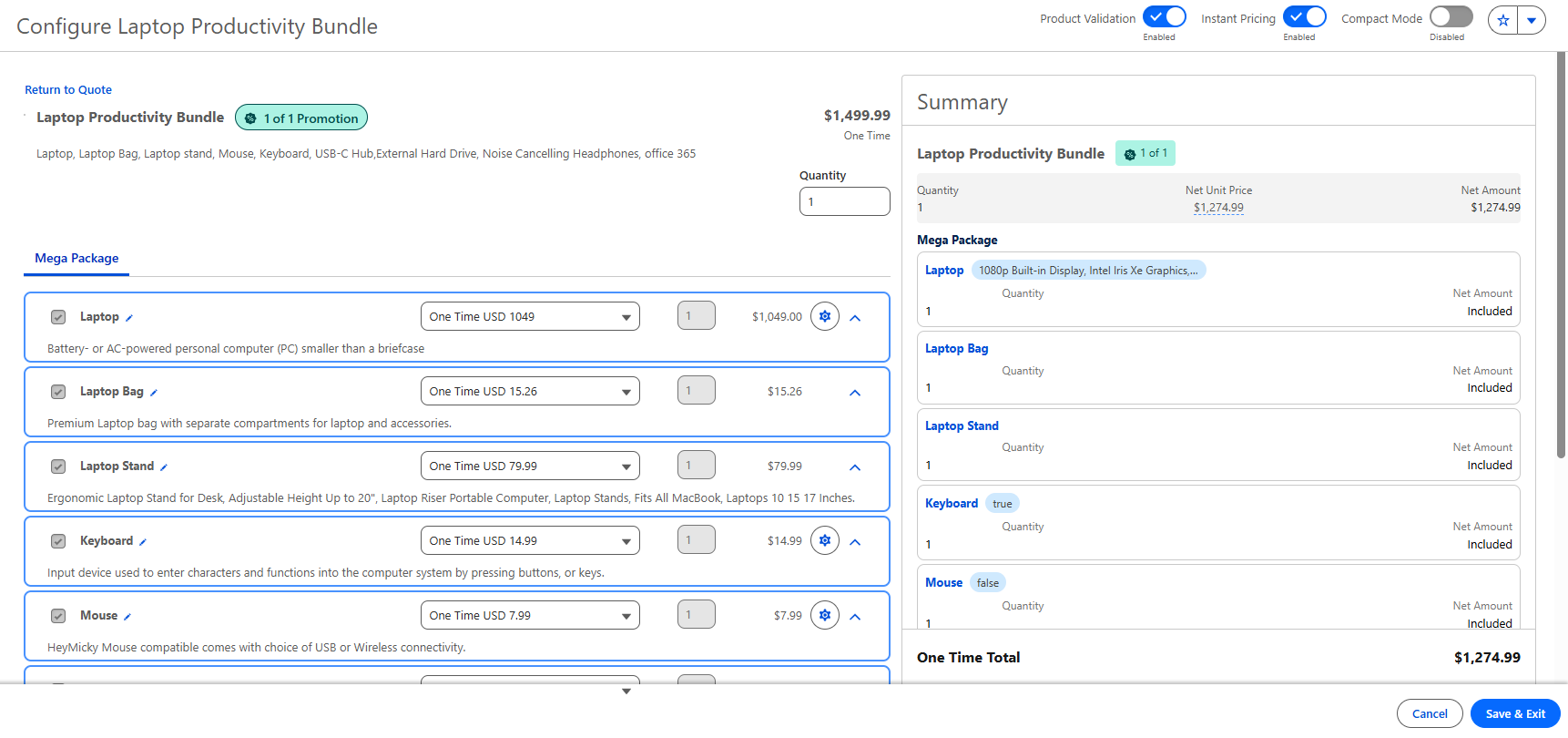
A hardware vendor offers $225 off a configured laptop productivity bundle – but only when the bundle actually ships as a bundle. The promotion targets the root product and applies cleanly: $1,499.99 becomes $1,274.99, logged as a structured record rather than a hand-typed figure.
Result: the discount applies to the bundle as a whole through its root product, not to individual lines inside it.
Already running ARM? We pick up implementations mid-flight – new features, migrations, and everything around it.
Promotions are easy to read as a marketing feature, and that is where most implementations go wrong. Setting them up is not a checklist of individual switches – it is one chain running through Context Service, Global Promotions Management, a rule library, a pricing procedure, configurator flows, and permissions.
Teams that enable those pieces one at a time, without looking at how they interact end to end, hit the same failure: nothing errors, and the discount simply never reaches the quote. The dependencies below are where that chain usually breaks:
Promotions and derived pricing don't share a procedure. The derived pricing element has to be removed before Promotion Execution goes in. Plan the procedure around one or the other.
Stacking is a policy decision. The evaluation method controls how discounts combine with each other; validate it against real multi-promotion carts before go-live, not after a customer finds the edge.
Renewals and contracted lines. The recommended filter keeps promotions off contracted and last-transaction lines – a promotion is a point-in-time offer, and carrying it silently into a renewal is rarely what anyone intended. Confirm your renewal behaviour explicitly rather than assuming the default matches your model.
Bundle scope and rounding. A child or category outside the bundle blocks the promotion, and discounts round to three decimals – small print that surfaces as a “why didn't it apply” ticket if nobody flagged it.
The bottom line
Promotions are a real upgrade: discounting that used to live in code now lives in a governed, auditable workspace, visible in the waterfall where anyone can trace it. That closes a gap teams have worked around for years.
The catch is that the upgrade isn't a single switch. A promotion only reaches the quote if six things line up behind it – context, settings, a rule library, a pricing procedure, flows, and permissions. Set Promotions up well and they handle the discount. Miss one link in the chain and they handle nothing at all.
Promotions reward setup that was done in order. Build the chain deliberately and the discount lands where it should; assemble it piecemeal and you'll spend the time you saved looking for the step that was missed.
FAQ: Spring’26 Promotions in Revenue Cloud (ARM)
When did Promotions become available in Agentforce Revenue Management?
Promotions are available in Agentforce Revenue Management as of Spring '26, through the native Global Promotions Management engine.
Can I use Promotions and derived pricing in the same pricing procedure?
No. The two can't coexist – you delete the derived pricing element before adding Promotion Execution. Design the procedure around one approach.
What's the difference between Stacked, First Eligible, and Highest Discount?
Stacked calculates every eligible promotion and adds them together; First Eligible applies the top-priority one per line and cart; Highest Discount applies the single largest per line and cart. The method belongs to the subgroup and decides how discounts combine.
Why isn't my promotion applying to a bundle?
The usual causes are a child product or category outside the bundle (which blocks it), missing record access or permission sets, or a Promotion Execution element placed wrong in the pricing procedure.
Why isn't the discount showing in the price waterfall?
Price Waterfall and Price Waterfall Persistence have to be enabled in Global Promotions Management Settings. Without them the promotion can apply correctly and still stay invisible to the rep.
Do Promotions apply automatically at renewal?
Not by default, and usually they shouldn't. The recommended pricing-procedure filter keeps promotions off contracted and last-transaction lines. Confirm renewal behaviour against your own model rather than assuming.

%20(3)%20(1).png)
.png)


%20(1).png)

%20(1).png)

%20(1).png)