How to Conditionally Disqualify End-of-Life Products in the ARM Catalog
How to hide end-of-life products from the catalog for new buyers while keeping them visible to accounts with an active contract – Context Definitions, Apex, and a Decision Table in ARM.
Leonid Blinov
Solution Architect
9 min read
·
August 25, 2026
In Agentforce Revenue Management, the catalog decides what a rep can put on a quote. When a product is discontinued, it should disappear from the catalog – but not for the customer who has been paying for it, let’s say, for years and is about to renew.
Both things are true at once: hide the product from new deals, keep it visible to the accounts that own it.
The usual alternative is a custom-built catalog component– a heavy build most teams would rather avoid. This article shows how to do that with Product Qualification – disqualifying end-of-life (EOL) products in general, while keeping the ones on an active contract.
Key takeaways
Product availability in ARM is a per-account decision, not a global flag. Product Qualification evaluates every product in the catalog at runtime, so “available” can depend on who is looking.
An Apex class carries the account's active-contract history into the catalog session through a Context Definition.
A Decision Table decides the outcome: the product qualifies if the account already owns it, or if it was never subject to the EOL check.
Any account-level attribute you can query drives availability the same way – region, entitlement, or customer tier.
Why product end of life is not a simple deactivation
The straightforward way to retire a product is to mark it inactive or let its end-of-life date pass, and let the catalog filter it out. That works for exactly one audience: prospects who have never bought it.
For an existing customer, the same product is still live. It sits on an active contract, it is being invoiced, and it will need to appear on the renewal quote and on amendments to the current term. If the catalog cannot show it, the rep works around the system – manual line entry, a clone of an old quote, a separate price book for legacy accounts. Each workaround puts data outside the pricing and configuration engine, which is where the real cost shows up later.
The requirement, stated properly, is conditional visibility: hide products from the catalog for everyone except the accounts that already own them under an active contract.
How product qualification controls availability in the ARM catalog
ARM runs a Qualification Procedure for every product in the catalog during discovery. The procedure decides whether each product is qualified – that is, whether the user sees it. This is the correct place for the rule, because it runs per product per session rather than as a static property of the product record.
What the procedure needs is context: it must know something about the account currently browsing. That is what the Context Service provides. A Context Definition describes the data structure available to the runtime, and a Context Data Input Array lets a Flow push additional values into that structure at the moment the catalog opens.
So the design has three moving parts:
Apex that answers “what does this account currently own under an active contract?”
A Context Definition that carries the answer into the discovery runtime.
A Decision Table that compares each product against that answer.
The rest of this article walks through each one.
Custom fields for product qualification
Four fields support the logic. Two of them are the payload, two of them are the rule.
Object
Field Label
API Name
Type
Purpose
Account
Active Contract Product IDs
ActiveContractProductIds__c
Text Area (Long)
Temporary storage for qualified Product IDs during execution
Product2
Is End of Life
IsEndOfLife__c
Formula (Boolean)
TODAY() > DATEVALUE(EndOfLifeDate)
Product Qualification
This Product ID
ThisProductId__c
Text
Stores the ID to be compared against the account's active list
Product Qualification
Is EOL Check Required
IsEndOfLifeCheck__c
Checkbox
Indicates whether the EOL validation should be performed
Two things to note here.
ActiveContractProductIds__c on Account is working storage, not master data. It holds the list assembled for the current catalog session. It is not a field anyone maintains by hand and it is not a field to report on.
IsEndOfLifeCheck__c on Product Qualification is what keeps the rule from applying to the whole catalog. Products that were never meant to be retired are simply not subject to the check, and they qualify without touching the account list at all.
After creating the fields, two setup steps follow:
Include Read/Write access to all four fields in the relevant Permission Sets.
Populate ThisProductId__c and IsEndOfLifeCheck__c on the Product Qualification records for the products in scope.
Context Service configuration
The Context Definition is the bridge between the Flow and the discovery engine. Without it, the Apex output has nowhere to go.
The two tags sit on different nodes for a reason. The owned-products list is a property of the account and is the same for every product evaluated in the session. The EOL status belongs to the product being evaluated.
Veloce implements Agentforce Revenue Management for teams whose requirements do not fit the out-of-the-box path.
BuildContextDataInputArray is invoked from the Catalog Flow. It takes an account ID, finds every product that account holds under an active contract, and returns it as a ContextDataInput the runtime can consume.
public with sharing classBuildContextDataInputArray{
publicclassFlowInput{
@InvocableVariable(required = true)public String accountId;
}
publicclassFlowOutput{
@InvocableVariablepublic List<runtime_industries_cpq.ContextDataInput> contextDataInputArray =
new List<runtime_industries_cpq.ContextDataInput>();
}
@InvocableMethod(
label = 'Build Context Data Input Array',
description = 'Creates the Array of ContextDataInput for additional Context Data'
)publicstatic List<FlowOutput> build(List<FlowInput> inputs){
FlowOutput result = new FlowOutput();
runtime_industries_cpq.ContextDataInput data =
new runtime_industries_cpq.ContextDataInput();
String accountId = inputs[0].accountId;
List<String> productIds = new List<String>();
for (AggregateResult ar : [
SELECT Product2Id
FROM OrderItem
WHERE Order.AccountId = :accountId
AND Order.Status = 'Activated' AND Order.Contract.Status = 'Activated' AND Order.Contract.StartDate <= TODAY
AND Order.Contract.EndDate >= TODAY
GROUP BY Product2Id
]) {
productIds.add((String) ar.get('Product2Id'));
}
data.nodeName = 'Account';
data.nodeData = new Map<String, Object>{
'ActiveContractProductIds__c' => String.join(productIds, ';')
};
result.contextDataInputArray.add(data);
returnnew List<FlowOutput>{ result };
}
}
The query is an aggregate on OrderItem grouped by Product2Id, which returns each product once regardless of how many order lines reference it. The filters define what “currently owns” means: the order is activated, the contract behind it is activated, and today falls inside the contract term.
Those filters are the business definition, and they are the part most likely to need adjusting. If your org treats a contract in its renewal window as still active, or recognizes ownership from Assets rather than Orders, this is the method to change. The rest of the pattern stays as it is.
The result is joined into a single semicolon-separated string and written to the Account node. One string, one context entry, evaluated against every product in the catalog.
The Decision Table: product qualification logic
The rule itself lives in a Decision Table rather than in Apex, which keeps it visible and editable to admins.
Name: Active_Contract_Product_Qualification_DT
Source Object:ProductQualification
Sequence
Field
Operator
Usage
1
ProductId
Equals
Input
2
ThisProductId__c
Contains
Input
3
IsEndOfLifeCheck__c
NotEquals
Input
–
IsQualified
–
Output
Read also: ARM Settings – A Practical Cheatsheet for Go-Live
The table uses Custom Condition Logic (2 OR 3). Read it as: the product qualifies if it appears in the account’s active list, or if it is not subject to the EOL check.
The Contains operator on row 2 is what makes the semicolon-separated string work – the product ID is matched against the concatenated list rather than against individual records. It also explains why the string is assembled in Apex rather than passed as a collection: the operator needs something it can search.
Row 3 is what keeps product disqualification limited to the products you actually retired. Products without the EOL check flagged pass on that condition alone and never depend on purchase history.
Flow integration: passing account context to the catalog
The last step wires the pieces into the Product Catalog Flow:
Define the variable. Create an Apex-Defined variable contextDataInputArray of type runtime_industries_cpq.ContextDataInput.
Get the account. Add a Query element that retrieves the current accountId.
Invoke the Apex. Call Build Context Data Input Array, using Manually assign variables to store the output into contextDataInputArray.
Update the UI component. In the Product List > Product List Page Container element, pass contextDataInputArray into the Context Data Input Array property.
Step 4 is the one that is easy to miss. The Apex can run correctly and the variable can be populated, and nothing will change in the catalog until the array is actually handed to the Product List component.
How the qualification runs at runtime
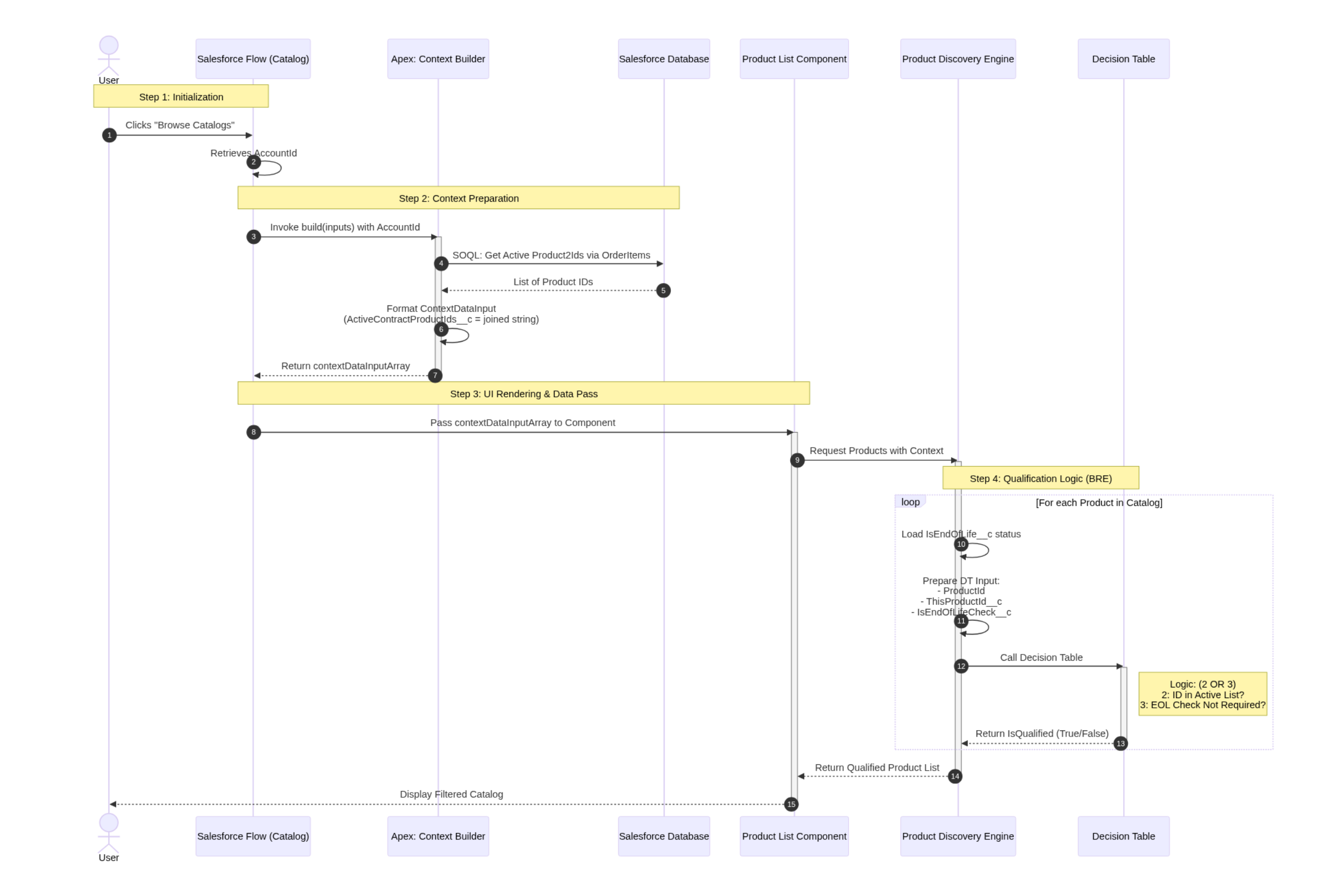
The diagram below traces one catalog session across all six participants – the Flow, the Apex class, the database, the Product List component, the discovery engine, and the Decision Table.
End-to-end sequence: from Browse Catalogs to a filtered product list
Fifteen steps, but only three of them carry the logic. The rest is plumbing – passing values between components that already know what to do with them.
The Apex class turns the account's contract history into a single string
(steps 3-7)
⇣
That string travels into the catalog session as context
(steps 8-9)
⇣
The Decision Table evaluates every product against it, one at a time
(steps 10-13)
A discontinued product is therefore invisible to a prospect and visible to the customer holding it on a live contract, from the same catalog, with no branching UI and no second price book.
Limitations worth knowing upfront
All four come down to your org's data – how much of it there is, and how it defines what a customer owns.
Catalog performance
The context builder runs on every catalog load, and the qualification evaluates against the injected data for every product. On large product sets, or with a heavier query than the one above, this can add measurable time to discovery. Test with production-scale data early rather than with a handful of sample records.
The context string has a size limit
ActiveContractProductIds__c is a Long Text Area, which has a maximum length. The Apex joins every owned product ID into one string, so the length grows with the account's purchase history. If a single account's history is large enough to approach that limit, size the field accordingly.
The ownership definition is org-specific
The SOQL above reads ownership from activated Orders under activated Contracts. That is one reasonable definition, not the only one. Confirm it against how your org records what a customer holds before treating the query as final.
Qualification controls visibility, not pricing
A product that becomes visible through this mechanism still needs a valid, current price entry to be added to a quote. Product EOL is often accompanied by price book cleanup, and the two changes need to stay coordinated.
Wrapping up
The configuration path is smaller than it looks: four fields, two context tags, one Apex class, one Decision Table, and four steps in the Catalog Flow. And end of life is only the example – once account-level data reaches the qualification context, the same structure drives availability by region, entitlement, or customer tier.
The alternative is a custom catalog component, and that estimate is usually where the requirement gets dropped. If you are looking at a requirement that does not fit the standard catalog, the Veloce team can help.
FAQ: End-of-life product qualification in ARM
What does product qualification do in Agentforce Revenue Management?
It decides, at runtime, whether a given product is shown to the user browsing the catalog. The Qualification Procedure evaluates each product in the catalog for the current session, which is what makes per-account availability rules possible.
Why not just deactivate the product or remove it from the price book?
Both apply globally. Deactivating hides the product from existing customers too, which breaks renewals and amendments for accounts that still hold it on a live contract.
What is a Context Data Input Array used for?
It lets a Flow inject additional data into the discovery context at runtime. Here it carries the list of products the account already owns, so the qualification logic has something account-specific to evaluate against.
Why is the product list a semicolon-separated string rather than a collection?
Because the Decision Table matches it with the Contains operator, which needs a searchable value. The string is assembled once per session and compared against each product’s ID during qualification.
Does this affect catalog performance?
It can. The Apex runs on every catalog load and the qualification evaluates per product. The impact depends on catalog size and the complexity of the query, so test with realistic data volumes before go-live.
Can this approach handle rules other than end of life?
Yes. The approach is not specific to EOL – the Decision Table conditions change, the architecture stays the same. What can drive availability depends on what your Context Definition exposes.


.png)
.png)