Configurable Subscription Products in Revenue Cloud: Modeling Recurring Revenue with Attributes
How to model a subscription as one product with price-driving attributes in Salesforce Revenue Cloud (ARM) – tiers, retention and regions as attributes, not a separate SKU per combination.
Andrejs Mankevics
Solutions Architect
9 min read
·
September 3, 2026
Most teams moving to Revenue Cloud carry the existing catalog over as-is, which is the moment a quiet problem becomes visible: one offering sitting there as a dozen near-identical products, one per tier, region and term that changes the price.
It doesn't have to stay that way. Those variations all move the price, but that alone doesn't make each a different product – in Revenue Cloud they can live on one product as attributes.
This article shows where the line falls: when a variation deserves its own product, and when it belongs on one as an attribute.
Summary
Subscription pricing that varies by tier, retention period and region can be one product with price-driving attributes, not a separate SKU per combination.
It is built in three layers: attributes define the choices, CML decides which combinations are valid, and attribute-based adjustments price each one.
CML controls what is selectable, not what it costs – expecting the constraint engine to touch pricing is the most common early mistake.
Keeping seats as the line quantity is what gives you volume tiers, proration and roll-ups for free.
The problem: one offering, many SKUs
Take an observability platform sold per seat per month, where the buyer picks a feature tier (Pro or Enterprise), a data retention period (3, 6 or 15 months) and a region (US, EU or APAC) – and every one of those choices moves the price. Model that as SKUs and you are building the cross-product:
2 tiers × 3 retention periods × 3 regions = 18 products
Each with its own price book entry, its own selling model, its own place in the catalog. Add a fourth region and all four of those counts climb together.
The catalog is not the only thing that suffers. When each tier is its own product, an upgrade means ending one subscription line and starting another – which breaks asset history and turns churn reporting into guesswork. That jump was only ever a price difference, yet the catalog is forced to treat it as a different product.
Revenue Cloud lets you model it that way. One product carries the choices as attributes, a constraint model keeps the illegal combinations out, and pricing reads the chosen values to land on a number. The seller configures a single product; the quote line carries the attribute values it was given.
Making that work takes three pieces, built in a set order because each depends on the one before it:
The first defines what the buyer can choose;
The second decides which of those choices are allowed;
The third turns an allowed choice into a price.
That same decision – a separate product or an attribute on one – usually lands during a migration, when the whole catalog is on the table anyway. It is the cheapest moment to model around attributes instead of carrying the old SKU structure across: settle it then, and a new tier or region becomes one more value, not one more product.
Facing a CPQ-to-ARM migration? See how we moved TCI in 8 weeks – live data converted, 1,000+ users, no disruption.
The model comes together in three passes, and the order matters:
The Product Catalog (PCM) defines the axes, CML draws the boundary between legal and illegal combinations, and pricing turns a legal point into money.
Each layer assumes the one before it.
Layer 1. The product and its attributes
There is one product – Observability Platform – built as a bundle that can be configured during sale, based on a Product Classification. The classification carries the attributes; the product inherits them. Its selling model is Term Based – Monthly. Four attributes hang off it:
Attribute
Type
Values
Price impacting
Seats
Number
read-only, mirrors line Quantity
no
Feature Tier
Picklist
Pro, Enterprise
yes
Retention Period
Picklist
3 / 6 / 15 months
yes
Region
Picklist
US, EU, APAC
yes
Three of the four move the price. The fourth, Seats, is deliberately not price-impacting. Volume pricing reads the line quantity directly, so this attribute isn't required – it simply mirrors the quantity in the configuration for the seller to see alongside the other choices.
One setup detail causes more silent failures here than any other: IsPriceImpacting has to be set on the ProductAttributeDefinition itself.
Setting it on the classification only establishes a default, and an attribute that is never linked through AttributeCategoryAttribute simply won't render in the configurator – no error, just an attribute that isn't there.
Layer 2. The constraint model in CML
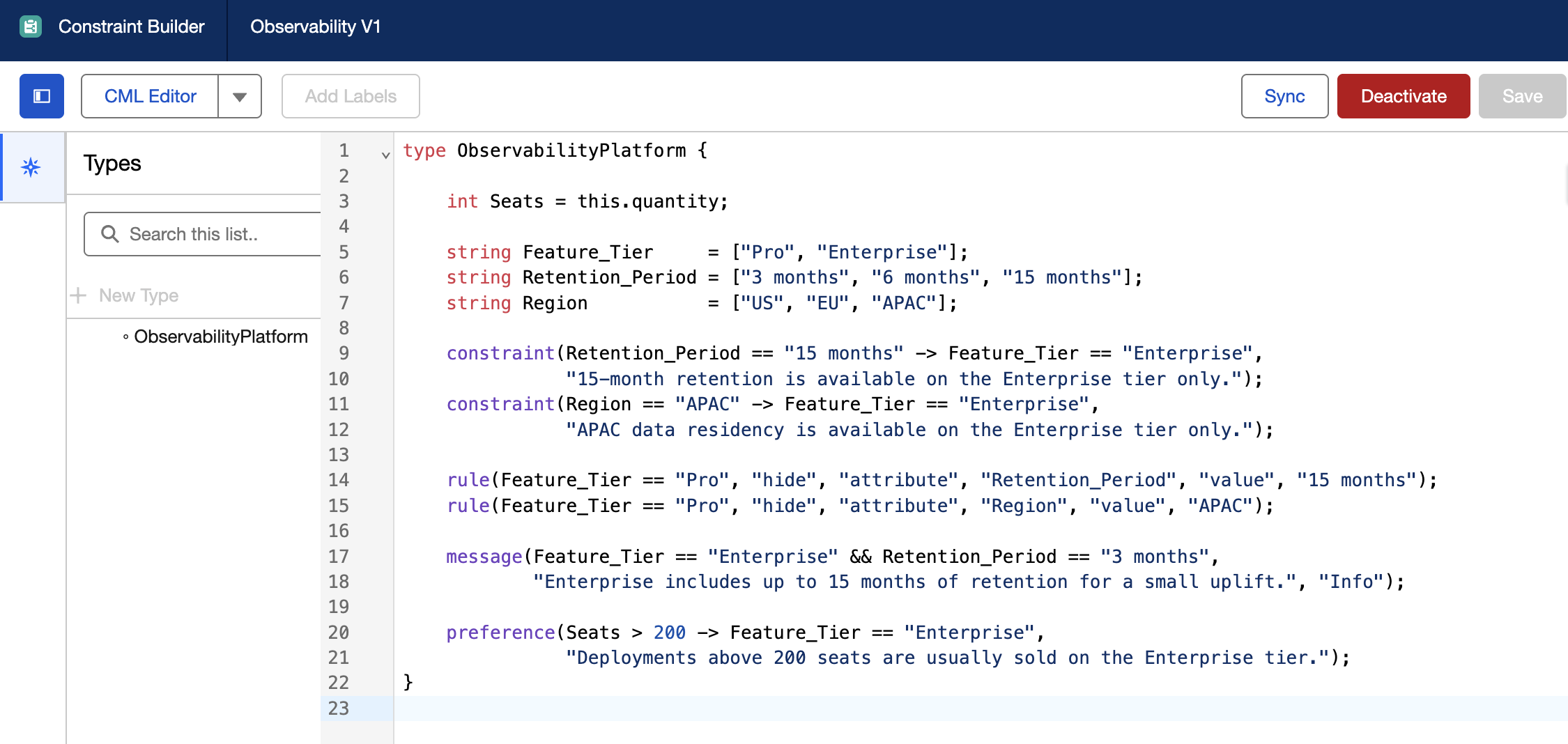
Attributes make all eighteen combinations reachable. A SKU list did the opposite: it encoded validity by omission – "Pro + 15 months" simply didn't exist as a product, so it couldn't be sold. With attributes, that combination is now selectable, so something has to say which combinations are actually deliverable. That is CML's job.
type ObservabilityPlatform {
    int Seats = this.quantity;
    string Feature_Tier     = ["Pro", "Enterprise"];
    string Retention_Period = ["3 months", "6 months", "15 months"];
    string Region           = ["US", "EU", "APAC"];

    constraint(Retention_Period == "15 months" -> Feature_Tier == "Enterprise",
               "15-month retention is available on the Enterprise tier only.");
    constraint(Region == "APAC" -> Feature_Tier == "Enterprise",
               "APAC data residency is available on the Enterprise tier only.");

    rule(Feature_Tier == "Pro", "hide", "attribute", "Retention_Period", "value", "15 months");
    rule(Feature_Tier == "Pro", "hide", "attribute", "Region", "value", "APAC");

    message(Feature_Tier == "Enterprise" && Retention_Period == "3 months",
            "Enterprise includes up to 15 months of retention for a small uplift.", "Info");

    preference(Seats > 200 -> Feature_Tier == "Enterprise",
               "Deployments above 200 seats are usually sold on the Enterprise tier.");
}
The two constraints cut the eighteen reachable combinations down to the thirteen that can actually be delivered. What is worth noticing is the range of enforcement in one model – CML offers four levels of strictness, and this example uses all four:
constraint blocks an illegal combination outright.
hide removes an option from view, so it can't be picked in the first place.
message informs the seller without stopping anything.
preference nudges toward the likely answer while leaving the seller free to override.
Picking the right level for each rule is a skill in itself – the gap between a rule that recommends and one that enforces is the kind of distinction we walk through in setDefault vs require in CML article.
Two lines deserve a closer look. int Seats = this.quantity mirrors the line quantity into the model – read-only, because CML never writes a quantity back. And every variable name has to match the attribute's DeveloperName exactly: a mismatched name still compiles, then silently receives nothing at runtime, which is a miserable thing to debug.
Here the constraint list is short, so implication rules are the natural fit. When the legal combinations grow into the dozens and start reading like a lookup table, that same logic is better expressed as a single table constraint rather than a growing pile of if/then lines.
Layer 3. Attribute-based pricing
CML has decided what's legal. Now something has to price it. A single PricebookEntry holds the base rate – $20.00 per seat per month, for the cheapest legal point (Pro / 3 months / US). Every other legal combination gets its price from an attribute-based adjustment, and each adjustment is assembled from three records:
AttributeBasedAdjustmentrule – the named rule the adjustment belongs to.
AttributeAdjustmentCondition – one row per attribute value, so three rows for a tier + retention + region combination.
AttributeBasedAdjustment – the record that carries the resulting price.
Enterprise + 6 months + EU, for instance, resolves to an override of $37.40 – no formula fields, no code.
Seats are priced separately, and this is where the earlier decision to keep them as line quantity pays off. Volume pricing uses a Price Adjustment Tier that reads the quantity directly: 1-50 seats at 0%, 51-200 at -10%, 201+ at -20%.
Keeping seats as quantity, rather than as another priced attribute, is what buys volume breaks, proration and quantity roll-ups without any custom work. One lifecycle note when you load these tiers: a tier can't be edited while its schedule is active, and a schedule can't be activated without an effective tier – so the working order is deactivate, load, then activate.
Following one price to the end
With the three layers in place, a configured line resolves to a single number – and every step of how it got there is visible.
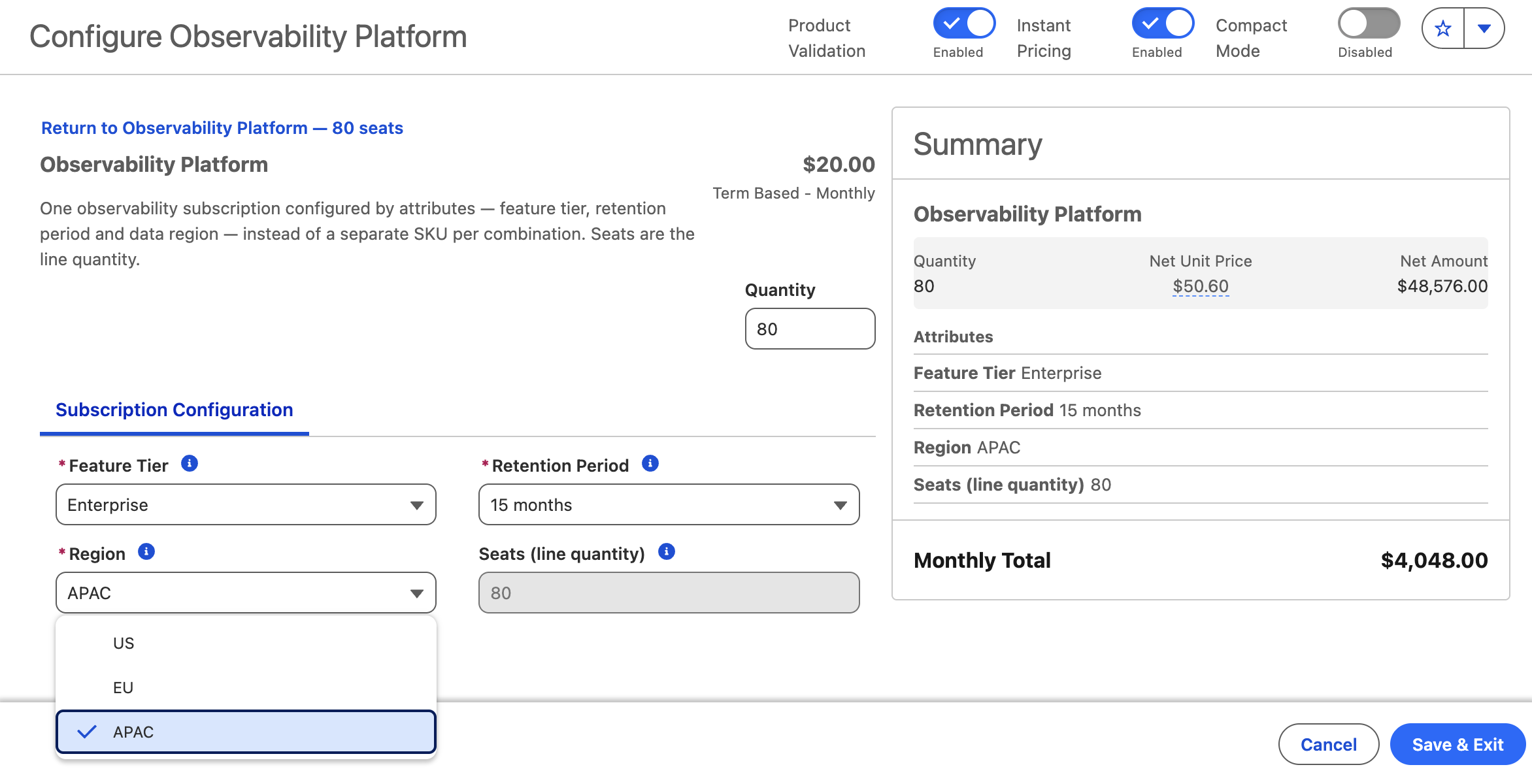
In the configurator the seller sees one product with four fields, and builds the exact deal without ever naming a SKU. Price updates on every click, rules run in the same pass: on Pro, the 15-month and APAC options simply aren't shown. Choose Enterprise with 3-month retention and the message rule surfaces the upgrade offer without blocking the choice.
What lands on the quote is one line – not one line per option, and not a SKU whose name secretly encodes the configuration. The attribute values sit on the line itself. Move the dates and the Pricing Term Count follows, carrying the period total with it, while the per-seat rate holds steady.
And since the tier is an attribute, a later upgrade is a change on the same asset – prorated, with a clean ARR delta.
The unit price is built in steps, and the waterfall traces each one back to a record. Take the configured example – 80 seats of Enterprise / 15 months / APAC:
List price ($20.00) – from the PricebookEntry;
Attribute adjustment (+$26.00, to $46.00) – from the matching attribute-based adjustment;
Volume tier (−10%, −$4.60) – from the 51-200 seat band;
Net unit price ($50.60) – the rate the term count multiplies.
The $50.60 unit price applies per seat, per month. With 80 seats and a Pricing Term Count of 12, the line total is $50.60 × 80 × 12 = $48,576. Change the dates, and the term count – and total – update while the per-seat rate stays the same.
The order is fixed in the pricing procedure: attribute adjustments first, tiered pricing after. So the volume break applies to the configured rate, not the base list price – which is exactly why the same seat count can land on a different net price depending on the tier and region chosen above it.
What most teams get wrong: "CML does the pricing"
The single most common misconception is that the constraint model sets the price. It can't. Pricing fields are off limits to the constraint engine – CML decides what is selectable, and attribute-based adjustments decide what the selection costs. Keep those two jobs separate and the model stays clean; blur them and you end up fighting the engine to do something it was never built for.
The second trap is subtler, and it lives in the two durations on this product. A 15-month retention period inside a 12-month term is not a contradiction – retention changes the rate, the term changes the number of periods. Treat them as one number and the math drifts. They answer different questions, and the model keeps them apart on purpose.
A separate SKU can still be the right choice. F.i., when the variation is genuinely a different thing to sell – a different revenue schedule, a different fulfilment path, a different entitlement footprint – rather than the same product at a different price. The attribute model shines when the difference is price; it is the wrong tool when the difference is the product itself.
Final thoughts
The instinct to spin up a SKU for every priced variation feels safe, but it quietly builds a catalog that grows by multiplication and a reporting problem that surfaces at renewal.
Modeling the variation as attributes on one product moves that complexity to where it belongs – into pricing records – and keeps the catalog, the asset history and the upgrade path clean. As we mentioned above, migration is the cheapest moment to make that call, because after go-live every extra SKU is one more thing to carry.
FAQ: Configurable Subscription Products in Salesforce Revenue Cloud
Does this reduce the number of combinations a customer can buy?
No – it reduces the number of products. All the priced combinations still exist; they live as pricing records that pricing ops owns, instead of SKUs that sellers have to hunt through. In the example, one product carries thirteen deliverable combinations behind a single catalog entry.
Can CML set or change a price?
No. The constraint engine has no read or write access to pricing fields. It governs which attribute values are valid and selectable; the price comes entirely from the pricing layer – price book entries, attribute-based adjustments, and tiers.
Why keep seats as the line quantity instead of as a price-impacting attribute?
Because quantity is what volume tiers, proration and quantity roll-ups all read. Model seats as an attribute and you give all of that up; keep them as quantity and you get it without custom work, while the price-driving attributes handle the rest.
What makes an attribute affect the price?
The IsPriceImpacting flag has to be set on the ProductAttributeDefinition, not just on the classification, where it only acts as a default. An attribute that isn't linked through AttributeCategoryAttribute won't render at all – a frequent cause of "my attribute disappeared" with no error to explain it.



.png)
.png)
.png)
.png)
.png)